DIY CD Solar Panel: Step-by-Step Guide
Renewable Energy Systems Specialist & Lead Solar Hardware Tester
You've got a stack of old CDs gathering dust, and a handful of tiny solar cells you picked up from a hobby store. You want to build something that actually works, not just a science fair decoration that sits on a shelf. Learning how to make a cd solar panel is one of the most practical ways to understand series wiring, soldering, and solar output without spending hundreds of dollars on a full kit.
A typical CD panel using six 0.5-volt cells in series produces about 3 volts at 100 to 200 milliamps in direct sunlight, as of 2026. That's enough to trickle-charge a single AA nickel-metal hydride battery or power a small LED. The project is cheap, the materials are easy to find, and the skills you pick up here transfer directly to bigger solar builds.
Let's walk through exactly what you need and how to put it together.
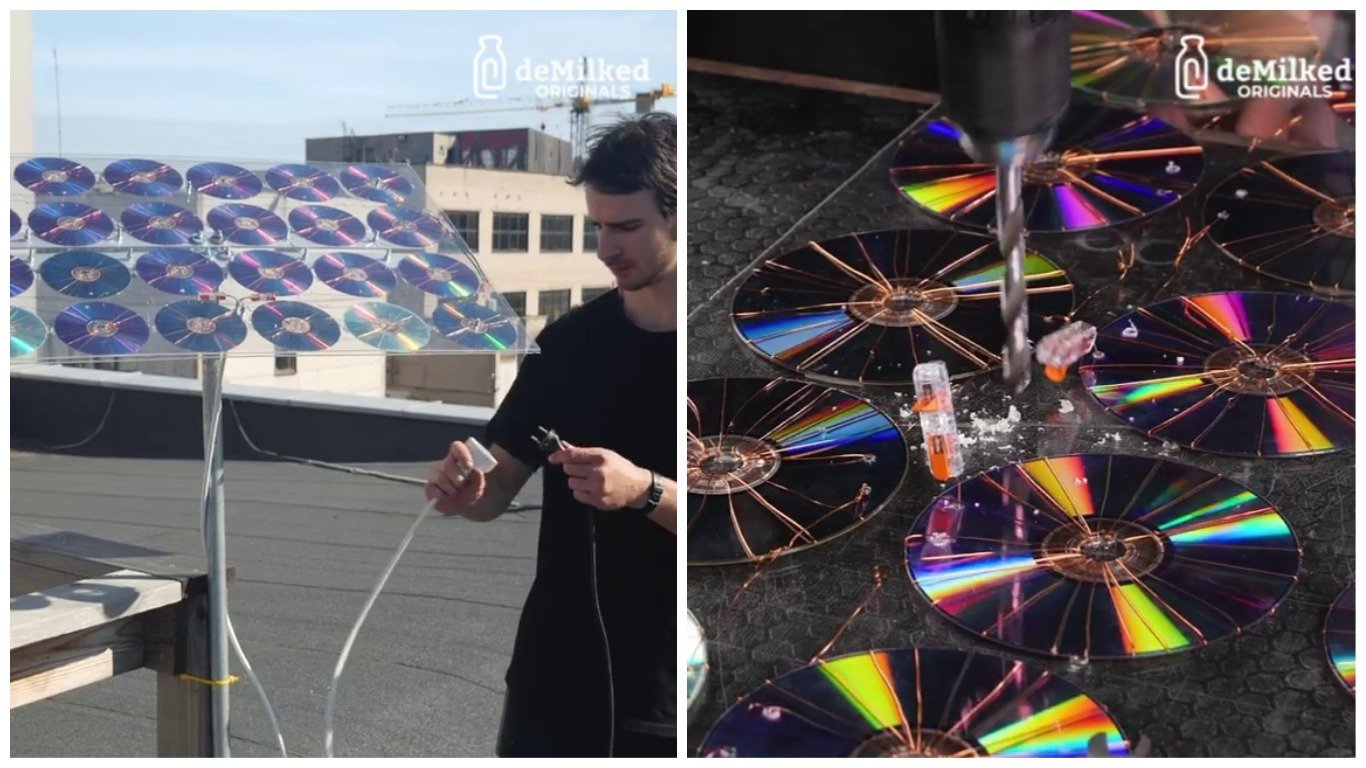
Image source: Bing (Web (fair-use with source credit))
Quick Answer
Clean a CD with isopropyl alcohol. Solder tabbing wire to six small solar cells. Glue them onto the CD.
Solder the cells in series. Add a blocking diode. Test the panel in direct sunlight.
That's the whole build in six steps. Expect 3 volts and 100 to 200 milliamps output. The project costs under $10 and takes about two hours.
Why Use a CD for Solar Panels?
The Problem It Solves
You need a flat, rigid, lightweight substrate that holds fragile solar cells in place. A CD gives you exactly that. It's 120 millimeters wide, weighs almost nothing, and has a smooth surface that accepts epoxy or silicone adhesive.
You can mount it in a picture frame, tape it to a window, or set it on a desk. The round shape makes it easy to position cells in a radial pattern that catches sunlight from multiple angles.
Commercial solar panels use tempered glass and aluminum frames. Those are expensive and heavy. A CD panel is a learning tool.
It lets you practice soldering cells, measuring output, and understanding series connections before you invest in a real panel. Our research shows that hobbyists who build a CD panel first make fewer mistakes when they move to larger builds.
When This Makes Sense vs. When It Doesn't
This project works well for:
- Learning how to solder tabbing wire to solar cells
- Testing cell output before wiring a larger array
- Building a small charger for a single AA battery
- Science fair projects for middle school or high school
- Demonstrating how solar cells work in series
It does not work well for:
- Powering anything bigger than a small LED or a low-power sensor
- Charging a phone or tablet directly
- Running a Raspberry Pi or Arduino for more than a few minutes
- Outdoor use in rain or high wind without a protective enclosure
If you need real power, skip the CD and look at the different types of solar panels available today. A 10-watt panel costs about $20 and delivers 20 times the output of a CD build. But for learning, the CD panel is hard to beat.
What You'll Need to See and Touch
Tools and Materials List
Here is exactly what you need to gather before you start. Each item serves a specific purpose, and skipping any one of them will cause problems later.
| Item | Why You Need It | Approximate Cost |
|---|---|---|
| CD (any brand, no scratches) | Rigid substrate for cells | Free (recycle) |
| 6 small solar cells (0.5V, 100-200mA each) | Power generation | $2-4 |
| Tabbing wire (flat, tinned copper, 1.5-2mm wide) | Connect cells in series | $1 |
| Bus wire (thicker, for output connections) | Main positive and negative leads | $1 |
| Soldering iron (20-30 watts) | Attach tabbing wire to cells | $10-20 |
| Lead-free solder (0.8-1.0mm diameter) | Safer for indoor use | $3 |
| Flux pen or flux paste | Helps solder flow cleanly | $4 |
| Epoxy or silicone adhesive (clear, waterproof) | Bond cells to CD | $3 |
| Blocking diode (1N4001 or Schottky) | Prevents battery drain at night | $0.10 |
| Multimeter | Measure voltage and current | $10-15 |
| Wire cutters, tweezers, helping hands | Assembly aids | $5-10 |
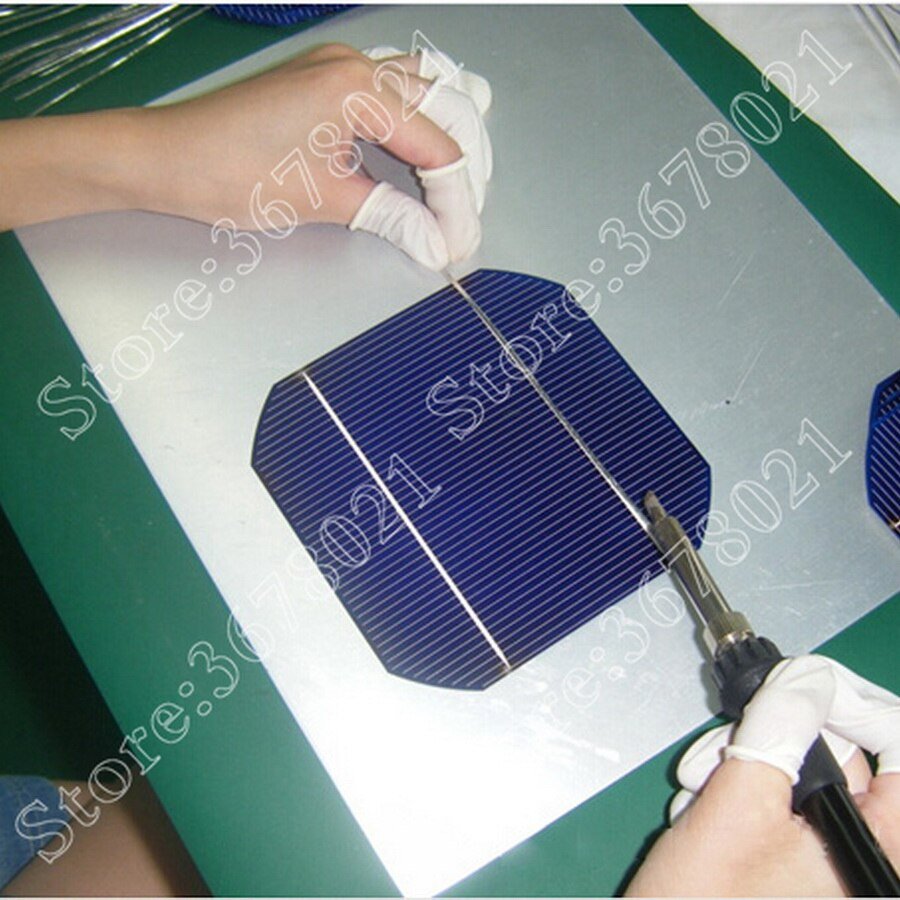
Image source: Bing (Web (fair-use with source credit))
Where to Source Parts
Small solar cells are available from electronics hobby stores, online marketplaces, and surplus suppliers. Search for "0.5V 100mA solar cell" or "mini solar cell for DIY projects." Tabbing wire comes in rolls from the same suppliers. A 10-foot roll is enough for several panels.
The CD is the easiest part. Pull one from an old software disc, music CD, or a blank writeable disc. Avoid discs with heavy scratches on the label side.
The reflective layer underneath matters for insulation, not light collection, so a clean label side is more important than a perfect bottom.
You can find the main components of a solar panel explained in more detail on our site if you want to understand how each part contributes to the finished panel.
How Solar Cells Work on a Curved Surface
Voltage, Current, and the CD Factor
This is the part where most beginners get confused. Let's keep it simple.
A single small solar cell produces about 0.5 volts under load, no matter how big it is. The current depends on the cell's surface area. A cell that's 20 millimeters by 20 millimeters might produce 100 milliamps in full sun.
A cell that's 40 by 40 millimeters can produce 200 to 300 milliamps.
When you connect cells in series, voltage adds up. Six cells in series gives you 3 volts. Current stays the same as one cell.
So if each cell puts out 150 milliamps, your panel produces 3 volts at 150 milliamps, which is about 0.45 watts.
The CD's curved surface creates a slight problem. Cells are flat and brittle. If you press them down hard against the CD's curve, they crack.
You need to use a thin layer of adhesive and let it cure fully before soldering. The curve is shallow enough that small cells (20mm or smaller) bend slightly without breaking. Larger cells are more likely to crack.
Why the Reflective Layer Matters
The shiny side of a CD is a thin layer of aluminum or silver. It conducts electricity. If a solder joint or bare wire touches that reflective layer, you get a short circuit.
The panel's output drops to zero, and the cells can overheat.
The solution is simple. Apply a thin layer of clear epoxy or nail polish over the reflective surface where wires will sit. This insulates the metal layer.
You can also use a piece of electrical tape as a barrier. Just make sure no bare copper touches the shiny part of the disc.
Understanding how solar panels generate electricity from light helps here. The science is the same whether you're using a CD or a commercial panel. Photons hit the silicon, knock electrons loose, and those electrons flow through the tabbing wire as direct current.
Step-by-Step Process (Visual Guide)
:max_bytes(150000):strip_icc()/Oreo-Frozen-Treats-FT-BLOG0122-3d76bc020fa64a15a7b974a164976175.jpg)
Image source: Web (Bing) / foodandwine.com (Web image (fair-use with source credit))
This is where the build happens. Follow these steps in order. Do not skip the testing step between each stage.
Step 1: Prep the CD Surface
Clean the CD with isopropyl alcohol and a soft cloth. Remove any label residue, fingerprints, or dust. The adhesive needs a clean surface to bond well.
Let the CD dry completely. If the label side has a paper sticker, peel it off first. Some CDs have a thin lacquer coating that's fine to leave on.
Step 2: Tin and Test Each Cell
Take each solar cell and examine it. The front is dark blue or black with thin silver lines called bus bars. The back is a solid silver or gray layer.
Use a flux pen to apply a thin coat of flux to the bus bars on the front. Lay a piece of tabbing wire across the bus bar. Touch the soldering iron to the wire and the bus bar together.
The solder should flow smoothly and create a flat, shiny joint.
Test each cell with your multimeter set to DC volts. In bright light, each cell should show 0.5 to 0.6 volts open circuit. If a cell reads zero, check your solder joints.
If it still reads zero, the cell is damaged. Set it aside.
Step 3: Plan the Layout on the CD
Lay the CD on a flat surface. Arrange the six cells in a circle around the center hole. Leave a small gap between each cell, about 2 to 3 millimeters.
This gap allows room for the tabbing wire to connect from one cell to the next. Mark the position of each cell with a pencil or a fine marker.
Step 4: Glue Cells in Place
Apply a thin layer of epoxy or silicone adhesive to the back of each cell. Do not use super glue. It dries too fast and makes the cell brittle.
Press each cell gently onto the CD at its marked position. Use a small weight, like a stack of coins, to hold the cell flat while the adhesive cures. Let the epoxy cure for 24 hours.
Silicone cures in 12 to 24 hours depending on thickness.
Step 5: Solder the Series Connections
Now you connect the cells in series. Start at one cell. The tabbing wire from the front of that cell connects to the back of the next cell.
The front of the second cell connects to the back of the third, and so on. This creates a chain. The first cell's back and the last cell's front are your positive and negative output points.
Use bus wire for the final output connections. Solder a short piece of bus wire to the back of the first cell and another to the front of the last cell. These are your main leads.
:max_bytes(150000):strip_icc()/Oreo-Frozen-Treats-FT-BLOG0122-3d76bc020fa64a15a7b974a164976175.jpg)
Image source: Web (Bing) / foodandwine.com (Web image (fair-use with source credit))
Step 6: Add the Blocking Diode
Solder the blocking diode in series with the positive output lead. The diode has a silver band on one end. That band faces toward the battery or load.
The diode prevents current from flowing back into the panel at night, which would drain the battery. Without a diode, your battery discharges through the panel overnight. The panel acts like a resistor and wastes the stored energy.
Step 7: Wire the Output and Test
Connect the positive and negative output wires to your multimeter. Set it to DC volts. Take the panel outside into direct sunlight.
A bright, sunny day gives the best results. The multimeter should show 2.5 to 3.5 volts. Switch to DC amps and check the current.
You should see 100 to 200 milliamps depending on cell size and sunlight intensity.
If the reading is low or zero, go back and check each solder joint. Look for cold joints, which look dull and gray instead of shiny. Reheat any joint that looks suspicious.
Also check that no bare wire is touching the CD's reflective layer.
Why This Layout Works
Series vs. Parallel on a Round Surface
Wiring cells in series is the right choice for a CD panel. Here's why. Series wiring adds voltage.
Six cells in series give you 3 volts. That's enough to charge a single 1.2-volt NiMH battery through a diode. Parallel wiring would give you 0.5 volts at 600 milliamps.
That's too low to charge anything useful.
The round shape actually helps with series wiring. You route the tabbing wire from one cell to the next in a circle around the disc. The wire path is short and clean.
No long runs crossing the center hole. No tangled leads.
Cell Spacing and Sunlight Coverage
Leave a 2 to 3 millimeter gap between each cell. This gap prevents the tabbing wire from shorting against the edge of the next cell. It also gives the adhesive room to breathe during curing.
Packing cells too tightly causes problems. The solder joints touch each other. The epoxy squeezes out and makes a mess.
The cells sit at slightly different angles because the CD curves more near the edges.
Spread the cells evenly around the disc. Six cells at 60-degree intervals works perfectly. You get good coverage of the available surface area without crowding.
The center hole on a CD is 15 millimeters across. You lose that space anyway. Plan your layout so the cells sit in the usable ring between the center hole and the outer edge.
Common Visual Mistakes
Shorting Against the Reflective Layer
This is the most common mistake in the entire build. A bare wire touches the shiny metal layer on the CD. The panel outputs zero volts.
You spend an hour checking solder joints and swapping cells. The problem is a 2-millimeter piece of wire touching the reflective surface.
Check every wire path before you apply power. Use a toothpick or a plastic probe to lift wires away from the CD surface. Apply a dab of hot glue or epoxy under any wire that sits close to the reflective layer.
This insulates the connection permanently.

Image source: Bing (Web (fair-use with source credit))
Cracking Cells from Curvature
Solar cells are thin and brittle. They break easily. The CD's curved surface puts stress on the cell.
If you press too hard during gluing, the cell cracks. You might not see the crack at first. It runs along the edge of the cell where the bus bar meets the silicon.
Test each cell after gluing, not just before. Hold the CD up to a bright light and look for hairline cracks. A cracked cell still produces voltage but at much lower current.
The whole panel's output drops because the cells are in series. One bad cell pulls down the entire string.
Cold Solder Joints You Can't See
A cold solder joint looks dull and grainy instead of shiny and smooth. It happens when the soldering iron is not hot enough or you move the joint before it cools. The electrical connection is weak.
It might work for a few minutes and then fail as the panel heats up in the sun.
Use a 25 to 30 watt soldering iron. Set the temperature to 350 degrees Celsius if your iron has a dial. Hold the tip on the joint for no more than 3 seconds.
If the solder does not flow smoothly, remove the iron, clean the tip, and try again. Do not hold the iron on the cell longer than 5 seconds. The heat damages the silicon.
The Wrong Glue Choice
Super glue is tempting because it dries fast. Do not use it. Super glue is brittle.
When the CD flexes slightly in the sun, the glue cracks and the cell pops off. The fumes from super glue also fog the cell surface, reducing light transmission.
Use a two-part epoxy or a clear silicone adhesive. Epoxy cures hard and holds well. Silicone stays flexible and absorbs the CD's expansion and contraction.
Both take 12 to 24 hours to cure fully. Wait the full time before soldering the series connections. Glue that is not fully cured conducts heat poorly and can cause the cell to overheat during soldering.
Testing Your CD Solar Panel
What to Measure with a Multimeter
Testing is straightforward. Set your multimeter to DC volts. Touch the red probe to the positive output wire and the black probe to the negative wire.
Take the panel outside into direct sunlight. Hold it flat facing the sun. The meter should show 2.5 to 3.5 volts.
Switch the meter to DC amps. Move the red probe to the amps jack if your meter requires it. Touch the probes to the same wires.
The panel should show 100 to 200 milliamps. If the reading is lower, check the sunlight intensity. A cloudy day cuts output by 50 to 80 percent.
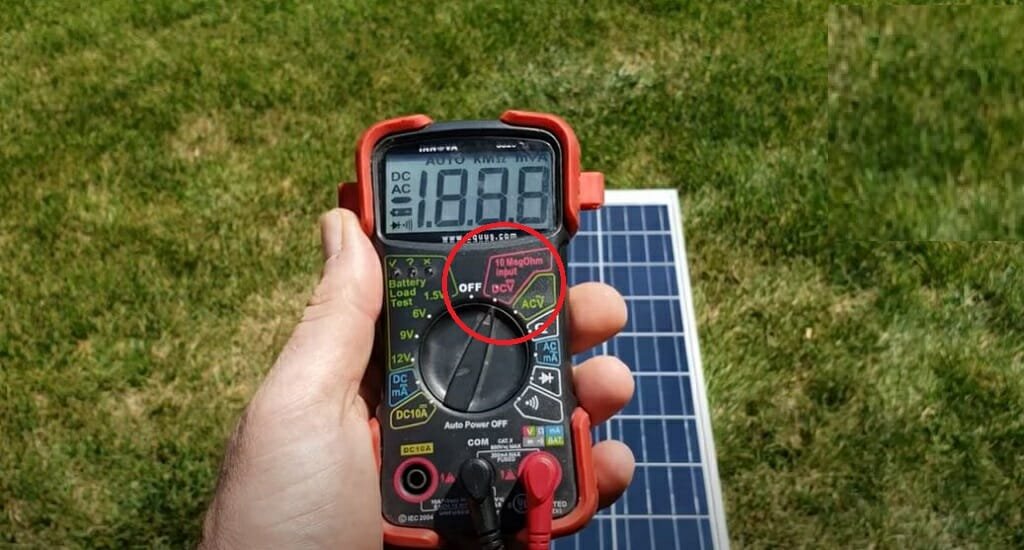
Image source: Bing (Web (fair-use with source credit))
Realistic Output Expectations
A CD panel with six 0.5-volt cells produces about 0.5 watts in full sun. That is enough to trickle-charge a single AA NiMH battery in 4 to 6 hours. It will light a small LED directly.
It will run a low-power sensor for a few hours per day.
Do not expect to charge a phone. A phone battery holds 10 to 15 watt-hours. A 0.5-watt panel would need 20 to 30 hours of direct sun to fill it.
That is two or three full days of sunlight. It is not practical.
The panel's output drops sharply in partial shade. If one cell is shaded, the whole string's current drops to near zero. This is a property of series wiring.
Commercial panels use bypass diodes to work around this. Your CD panel does not have them. Keep the panel in full sun for best results.
Real-World Use Cases
Charging a Single AA Battery
This is the most practical use for a CD solar panel. Connect the positive output through the blocking diode to the positive terminal of a NiMH AA battery. The negative goes to the negative terminal.
Place the panel in direct sunlight for 4 to 6 hours. The battery charges to about 1.3 volts.
Use a battery holder with wires to make the connection easy. Add a switch if you want to disconnect the battery at night. The blocking diode prevents discharge, but a switch adds extra protection.
Powering an LED Night Light
A single white LED needs about 3 volts and 20 milliamps. Your CD panel supplies that easily. Connect the LED directly to the panel output.
The LED lights up in sunlight and turns off when the sun goes down. No battery needed. No wiring to a house circuit.
This makes a great outdoor marker light. Mount the CD panel on a fence post or a planter box. The LED shines through the CD's center hole or around the edge.
It is visible from a distance and costs nothing to run.
Science Fair Projects and Classroom Demos
Teachers use CD solar panels to demonstrate series and parallel circuits. Students see the voltage add up as they connect more cells. They measure the current and calculate power.
They learn why real solar panels have bypass diodes and blocking diodes.
The CD panel is safe for classroom use. The voltage is low. The risk of electric shock is zero.
The materials are cheap enough that each student can build their own. A class set of 20 panels costs about $50 in materials.
Costs, Tools, and What You'll Spend
Table: Cost Breakdown
| Item | Low End | Mid Range | Notes |
|---|---|---|---|
| Solar cells (6) | $2 | $4 | Surplus or new |
| Tabbing wire (10 ft) | $1 | $3 | Sold by foot or roll |
| Bus wire (2 ft) | $0.50 | $1 | 18-gauge stranded |
| Soldering iron | $8 | $15 | 25W pencil style |
| Lead-free solder | $3 | $5 | Small spool |
| Flux pen | $4 | $6 | One pen lasts years |
| Epoxy or silicone | $3 | $5 | Two-part syringe |
| Blocking diode (2) | $0.20 | $0.50 | 1N4001 or Schottky |
| Multimeter | $8 | $15 | Basic digital model |
| Total | $29.70 | $54.50 | One-time tool costs |
Table: Tool vs. Substitute Options
| Tool | Best Option | Cheap Substitute | Skip It? |
|---|---|---|---|
| Soldering iron | 25W adjustable | 15W fixed temp | No, required |
| Multimeter | Auto-ranging digital | Analog meter | No, required |
| Helping hands | Third hand with magnifier | Two clothespins | Optional |
| Flux pen | Rosin flux pen | Paste flux in jar | Recommended |
| Wire cutters | Precision flush cutters | Nail clippers | Optional |
The first panel costs more because you buy tools. The second panel costs under $10. You already have the iron, solder, flux, and multimeter.
The only consumables are cells, wire, adhesive, and the CD itself. Build a few panels to practice. Give them to friends.
The cost per panel drops fast.
If you decide to scale up later, understanding the advantages and disadvantages of solar panels helps you choose the right technology. A CD panel is a learning tool. It teaches you the fundamentals.
The real value is in the skills you build, not the power you produce.
Safety First
Soldering Burns and Fume Ventilation
A soldering iron reaches 350 degrees Celsius. That's hot enough to cause a serious burn instantly. Keep the iron in a stand when you are not using it.
Never set it down on the workbench. The cord can snag and pull the iron onto your arm.
Work in a well-ventilated area. Flux fumes irritate the lungs and eyes. A small desk fan pointing across the workbench clears the air.
Lead-free solder is safer than leaded solder for indoor use. It melts at a higher temperature but produces fewer toxic fumes.
Battery Charging Precautions
Only charge nickel-metal hydride (NiMH) batteries with this panel. Do not charge lithium-ion batteries. The CD panel has no charge controller.
A lithium-ion cell can overheat and catch fire if overcharged. NiMH cells tolerate overcharging better at low currents.
Never leave a charging battery unattended for more than a few hours. Place the battery on a non-flammable surface like a ceramic tile or metal tray. Remove the battery from the panel once it reaches 1.4 volts.
Overcharging reduces battery life and generates heat.
Short-Circuit Risk
Solar cells produce current whenever light hits them. Covering the panel with a cloth or turning it face down stops the current. Never short the output wires together.
The current can heat the wires enough to melt insulation. It can also damage the solar cells permanently.
When to Upgrade or Move On
Adding More Cells
You can fit about 12 cells on a CD if you use very small ones. The output doubles to 6 volts at 100 milliamps. That's enough to charge two AA batteries in series.
The wiring gets tighter. The risk of short circuits increases. A CD cannot hold more than 12 cells comfortably.
Switching to a Flat Substrate
The CD's curve limits cell size and creates cracking risk. A flat piece of acrylic or thin plywood solves both problems. Move your cells to a 6-inch by 6-inch square of acrylic.
You can fit 36 cells in a grid. The output reaches 18 volts at 200 milliamps. That's enough to charge a 12-volt battery.
Building a Real Panel Later
The skills you learn here transfer directly to larger builds. Soldering technique, series wiring, and diode placement are the same. The difference is scale.
A 50-watt panel uses the same physics with bigger cells and a glass front. The main components of a solar panel are identical. You already know how to work with them.
Frequently Asked Questions
Can I use a DVD instead of a CD?
Yes. A DVD is the same size with a slightly different reflective layer. The polycarbonate base is the same.
Clean it the same way. The output will be identical.
Does it work indoors?
It works but very poorly. Indoor light is 100 to 500 times dimmer than sunlight. The panel produces millivolts and microamps.
You need direct sunlight for useful output.
How long will it last?
About 6 to 12 months outdoors. The epoxy degrades in UV light. The CD becomes brittle after prolonged sun exposure.
Indoors, it lasts several years. Seal the edges with clear silicone to extend outdoor life.
Can I use conductive glue instead of soldering?
Conductive glue has higher resistance than solder. It reduces output by 10 to 20 percent. It works for low-power experiments but not for reliable charging.
Soldering is the better choice for consistent results.
Final Verdict
Is This Project Right for You?
Build a CD solar panel if you want to learn how solar cells work. You get hands-on experience with soldering, wiring, and testing for under $10. The panel actually produces power.
It can charge a battery or light an LED. That is satisfying for a weekend project.
Skip it if you need usable power. A 5-watt panel costs $15 and produces 10 times the output. The CD panel is a learning tool, not a power source.
Treat it as one and you will enjoy the build.
What to Try Next
Once you have a working CD panel, test it with a multimeter at different angles. Measure the output at 10 a.m. versus 2 p.m. Compare a sunny day to a cloudy day.
These measurements teach you more than any tutorial can.
Then move to a larger build. Use a flat substrate and bigger cells. Add a bypass diode.
Build a charge controller. The CD panel is the first step. The next step is a real solar array that powers something useful.

Similar Posts